🚨 Enter to win an all-expenses-paid ticket to the Lenny & Friends Summit
[My YouTube channel](https://www.youtube.com/@LennysPodcast) just crossed 100,000 subscribers (😱), so to celebrate, and to thank you for listening, I’m hosting my biggest ever giveaway:
Win an all-expenses-paid ticket to the [Lenny & Friends Summit](https://lennyssummit.com) on October 24th in San Francisco. One lucky winner will get a ticket to the summit, a round-trip flight to San Francisco, and a hotel stay for two nights.
To enter, just subscribe to Lenny’s Podcast on Apple, Spotify, and YouTube, leave a rating, and fill out this form.
Already did these things? You can still enter!
I’ll pick a winner on August 29th and notify them by August 31st. Enter here. Good luck!
Now, on to this week’s post…
My post a few weeks ago on time management techniques that actually work is on track to be my most popular post ever (wtf!). Since I left a bunch of tactics out of that post to keep it from feeling overwhelming, I’ve got seven more productivity tricks for you that I use regularly:
1. Set arbitrary deadlines
Deadlines work. Even arbitrary ones.
One of my favorite techniques for getting someone to finish something that’s important but not urgent is to come up with an arbitrary deadline together. I say to the person, “Let’s come up with an arbitrary deadline!” We both know it’s made up, but there’s a weird gravitational pull once you’ve put a date out there.
It’s important to have the person doing the work pick the deadline so that it’s a date that works for them. You’d be surprised how often it’s very reasonable. And how often they hit it.
Pick a waiting-for off your list that’s been lagging, and float the idea of picking an arbitrary deadline to that person.
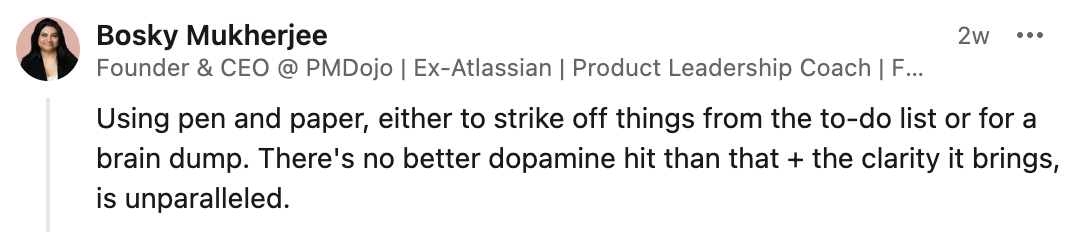
2. Use pen and paper for your to-dos—and rewrite them each morning
Something I’ve learned about myself is that if my to-dos are sitting inside an app on my laptop, the one place I don’t want to look is that app on my laptop. There’s hard work to do there! Let’s check my email and Slack channels for the thousandth time instead.
However, when my to-dos are sitting right in front of my face, in a nice notebook I can’t swipe away (and always have with me), I’m much more likely to see the work I need to do, and thus work on the things I should be working on.
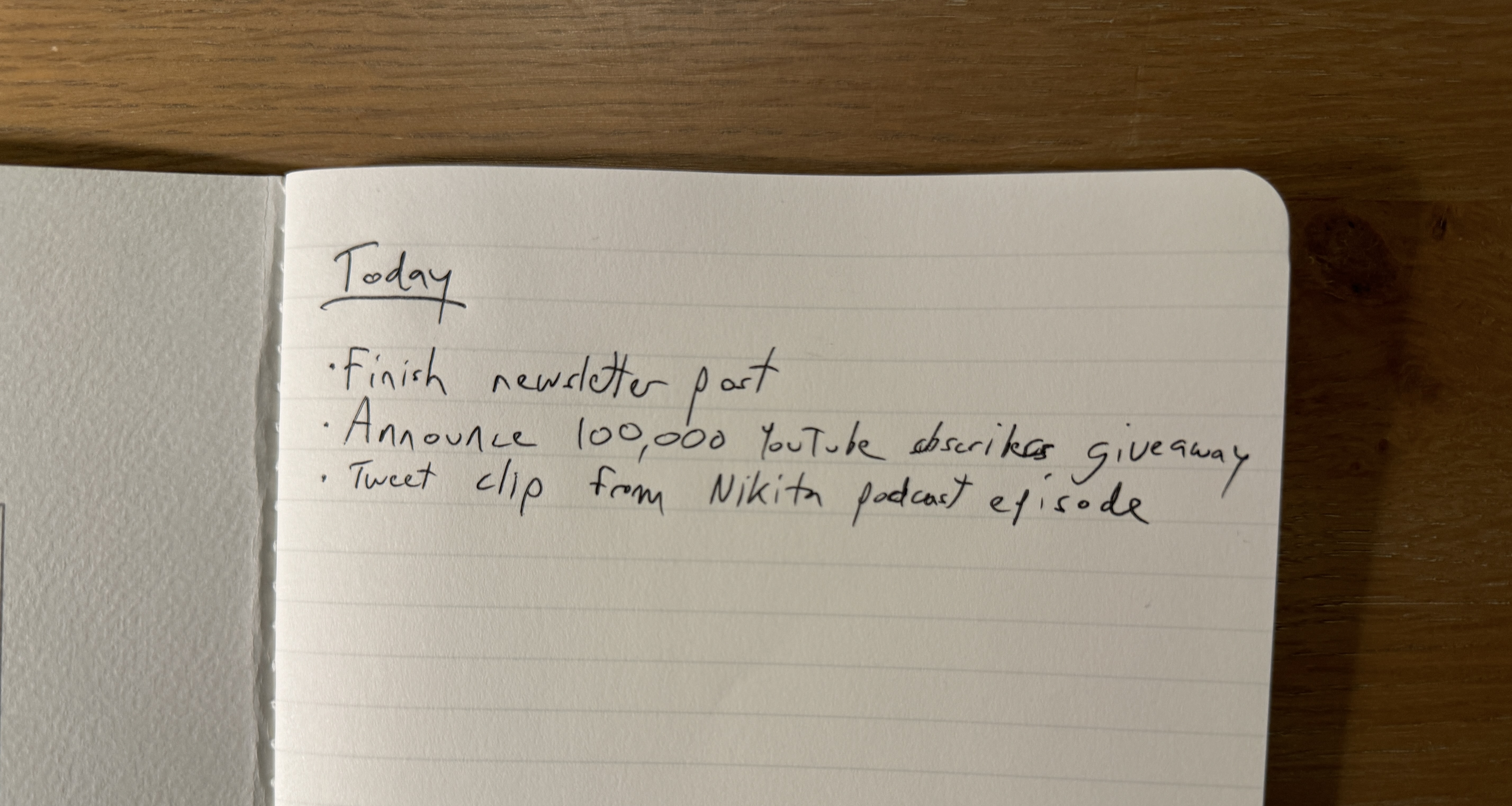
A secondary trick I found to be super-effective is to rewrite my to-dos each morning on a fresh page. I tear out the previous page, transferring anything that wasn’t done but is still a priority for today to the new page. I rethink my top 1-3 priorities and, in the process, remove stuff that I’ve been transferring for too many days.
As a bonus, it also feels so damn nice to cross out a to-do physically, and tear out pages and throw them away. It may be irrational, but it’s much more satisfying than checking a checkbox in a to-do app.
A reader shared the same advice with me:
3. Say no to stuff you’ve said yes to
In the previous post, I shared a tactic for knowing when to say no: ask yourself, would I say yes if it were tomorrow? Well, often we still say yes, and today is now almost tomorrow. And you’re wishing you didn’t say yes.
Here’s the good news: often you can still get out of it, without much issue. This will save you a bunch of time and stress, and it’s almost always not a big deal to that person. It just takes crafting the right message to that person.
There are basically three routes you can take here:
1. Light: “Hey John, I see this presentation I offered to give is coming up, and I’m finding myself unexpectedly slammed right now. I’m still totally on board with giving it, but I wanted to just check—how important, and timely, is this presentation to your team? If it’s not that big of a deal, I’d love to skip it, or push it out. Let me know if that’s OK. But again, I don’t want to cause you trouble, so if it’s important, I’m still 100% happy to make it happen.” 2. Medium: “Hey Michelle, I noticed our meeting is coming up later this week. Any chance we could skip the meeting and knock it out over email async?” 3. Heavy: “Hey Steven, bad news. I won’t be able to make the coffee chat we have coming up next week. Something timely came up, and I need to prioritize it. Very sorry about this.” ← Try not to do this, but it’s also OK occasionally.
Backing out of something can feel terrible, but once you’ve experienced the relief from not having to do something your former self agreed to, you’ll find there’s a lot of power here. Better still, you’ll get better at saying no in the first place.
4. Build out a library of text replacement snippets
Anytime I find myself writing out an address, phrase, or paragraph over and over again, I turn it into an auto-expanding snippet. I’ve created snippets for common email replies, URLs, email addresses, and sentences I find myself using often.
To do this, I’ve settled on using an app called TextExpander. It’s fugly, but has the best combination of features. Here’s a screenshot of some of my snippets:
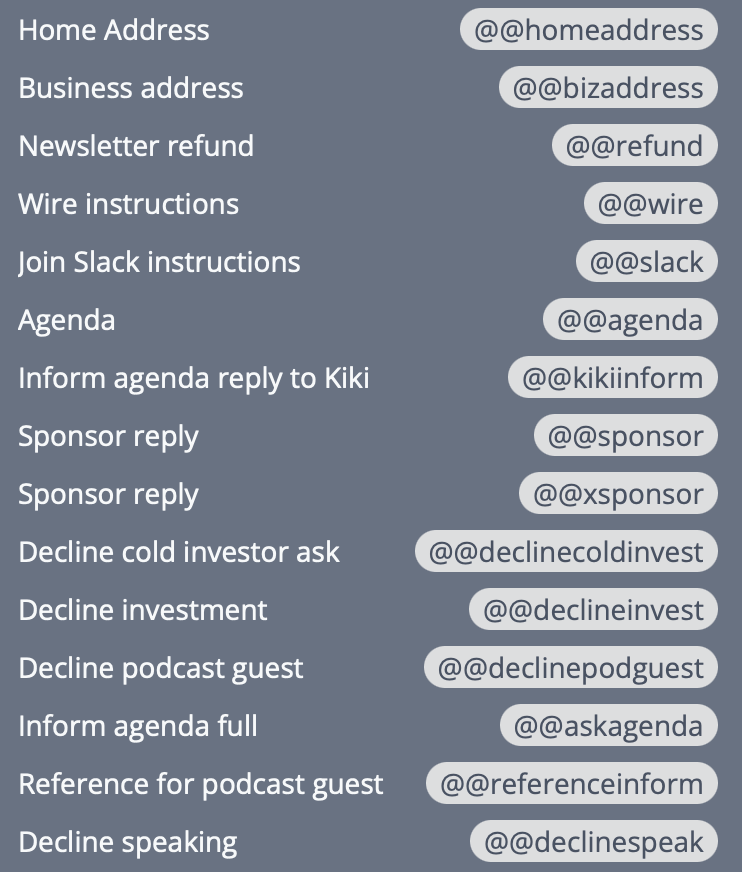
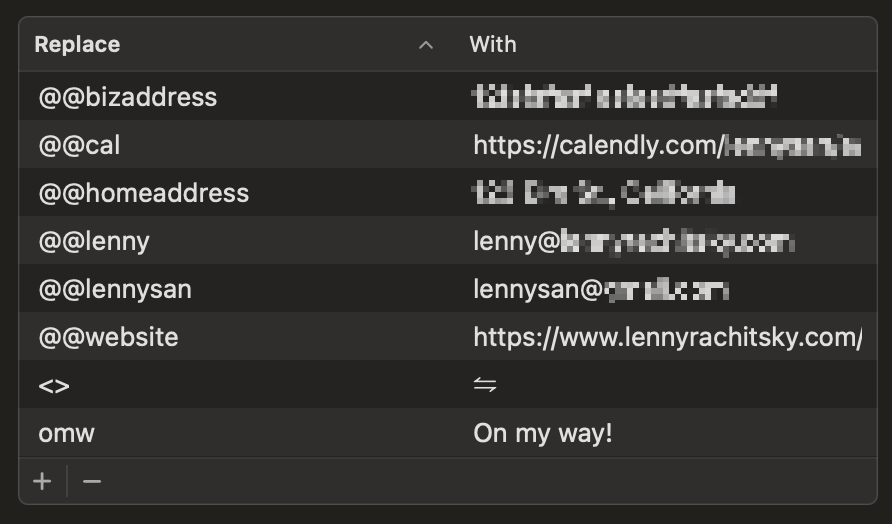
For most people, though, if you’re on a Mac, I’d highly recommend starting with the built-in text replacement feature. Go to System Settings → Keyboard → Click Text Replacements under Text Input. To poke your toes in the water, add a few replacements (click the “+” on the bottom left) for your email address(es), Calendly link, and a URL you often share. I settled on starting my snippets with “@@” since I never use this in regular writing, but some people like to start with “/” or “;” or “-”. Try stuff and see what feels natural.
5. Do an end-of-day calendar review for the next day/week
At the end of each day, spend 15 minutes reviewing your calendar for the next day. And on Friday (or Sunday) evening, review your calendar for the week ahead. During this time:
1. Review meetings you’ve got coming up, and think about what you need to do to be ready for them. 2. Write out your 1-3 most important to-dos in your notebook (see tip #2 above). 3. Slot important to-dos into your calendar (per my advice in last week’s post). 4. Check in on waiting-for’s that have been lagging. 5. Look at meetings you can kill, or shift, in order to make your day more productive. 6. Extra credit: Reflect on whether you used your day/week well. See tip #6 below.
This one habit took my anxiety each morning from “holy shit I’ve got so much to do” to “I’ve got this.” You start feeling ahead of the curve versus always starting the day a little behind. Also, you can spot days/weeks where you’ve taken on way too much, and adjust (or simply set expectations) accordingly.
My approach to making time for this process is to do it each afternoon right before I leave for the day, and then on Sunday evening. I know it’s not ideal to be working on Sunday evening, but I rarely get to this on Friday, and even spending 15 minutes before the craziness of the week kicks in has a huge impact on my week.
Cal Newport has a technique he calls the work shutdown ritual, where he takes this idea further and even says the words “schedule shutdown, complete” when he finishes it 😅 (Thank you to reader Beth Spencer for sharing this with me.)
6. Do a time and energy audit
What do you want to be spending your time on? I bet it’s things like longer-term strategy, in-depth product design feedback, identifying blockers coming around the curve, mentorship, and leveling up your writing/thinking in a few key docs and decks.
What are you actually spending your time on? I bet it’s not that.
Step one in addressing this mismatch is to see how you’re currently allocating your time, to identify your revealed preferences versus your stated preferences.
I couldn’t find a good guide for how to do this well, so I asked Perplexity and got a great answer.
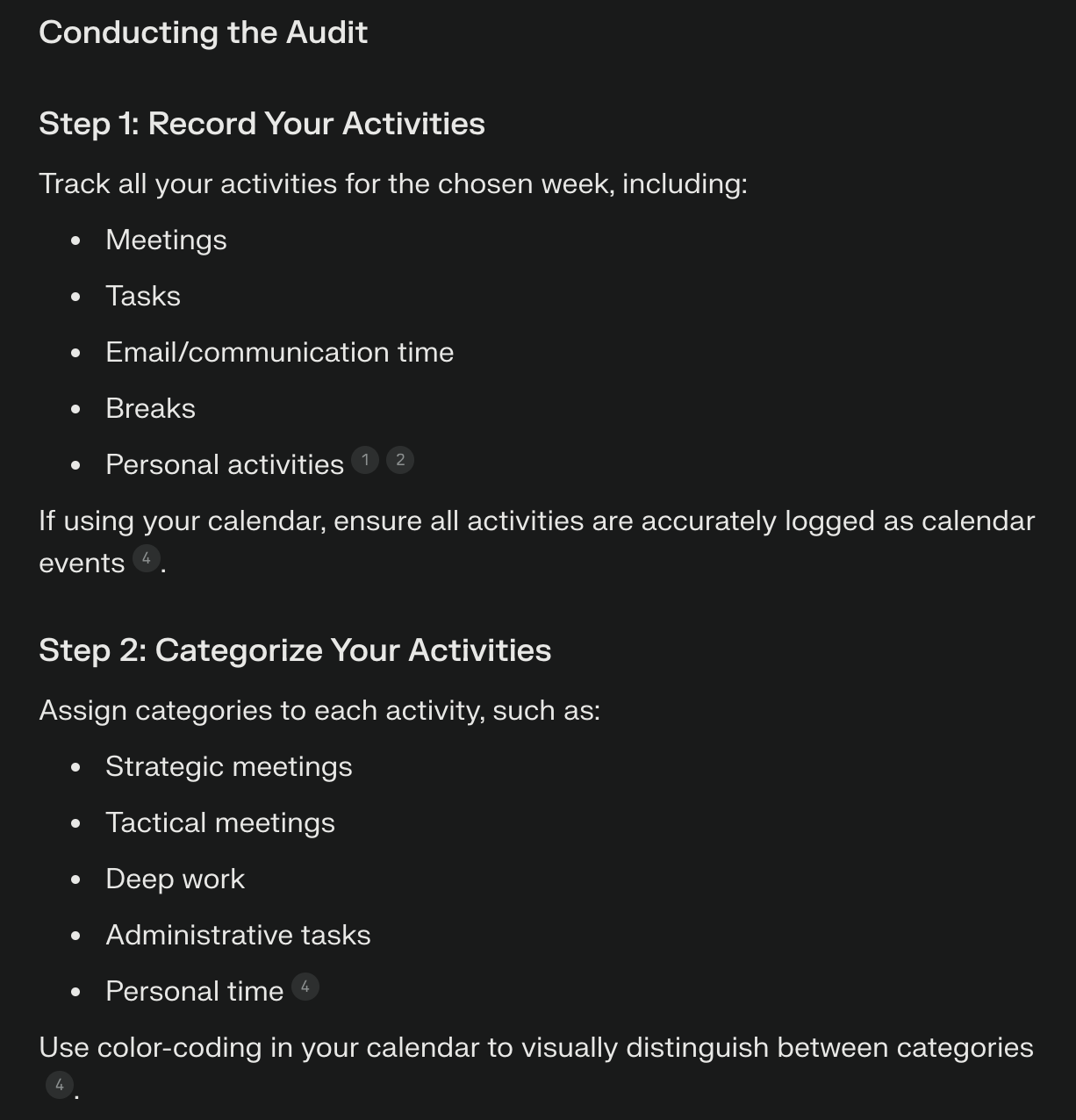
In addition to doing a time audit, I’ve also found an energy audit to be transformative. What type of work gives you energy? What saps you of energy? Wouldn’t that be good to know, so that you can do more of the former and less of the latter? Yes indeed.
That audit will inform how you want your day-to-day schedule to ideally look, and will help you use your energy best throughout the day. Here’s an amazing step-by-step guide from Matt Mochary for how to do this, and here’s a video walk-through if you’d prefer:
7. Set up your environment for flow
When have you felt the most productive? Where were you sitting, what were you wearing, what did you eat/drink, and what time of day was it? Learn what your mind and body need to get into the flow.
For me, it’s:
1. A good pair of over-ear headphones 2. Binaural beats (e.g. Brain.fm) 3. Caffeine (or something like Magic Mind) 4. Fast, reliable Wi-Fi 5. Having 1 to 3 clear to-dos that I know I’ll be focusing on 6. At least two hours to work, with confidence that I won’t be disturbed (here’s tips for that) 7. Ideally, in the morning
Knowing this, I make sure to have all of these in place whenever I need to get deep work done—basically, every day.
What is this list for you? I’d actually love to know. Share it in the comments and see what other folks say too:
📚 Further study
1. How Future Billionaires Get Sh\*t Done by Y Combinator 2. Entrepreneur Life: Tips to manage your time as a startup founder by Caya 3. Pmarca Guide to Personal Productivity by Marc Andreessen 4. Leave a Summary for Yourself by David Perell
Have a fulfilling and productive week 🙏
👀 Hiring? Or looking for a new job?
I’ve got a white-glove recruiting service for senior product roles, working with a few select companies at a time. If you’re hiring, apply below.
If you’re exploring new opportunities yourself, use the same button above to sign up. We’ll send over personalized opportunities from hand-selected companies if we think there’s a fit.
If you’re finding this newsletter valuable, share it with a friend, and consider subscribing if you haven’t already. There are [group discounts](https://www.lennysnewsletter.com/subscribe?group=true), [gift options](https://www.lennysnewsletter.com/subscribe?gift=true), and [referral bonuses](https://www.lennysnewsletter.com/leaderboard) available.
Sincerely,
Lenny 👋